Bits, Boolean Operations & Logic Gates
Bits - The Fundamental Unit
Bit (Binary Digit): The smallest unit of data in a computer, represented as either 0 or 1. All information inside computers is encoded as patterns of bits.
Bits represent:
- Numeric values: Binary numbers
- Characters: Text through encoding standards like ASCII
- Images: As collections of pixels
- Sounds: Through sampling of audio waves
Boolean Operations
Boolean Operation: An operation that manipulates true/false values, where bit 0 represents false and bit 1 represents true.
Basic Boolean Operations:
| Operation | Symbol | Description | Cybersecurity Application |
|---|---|---|---|
| AND | ∧ | Returns true only if both inputs are true | Access control logic, permission checks |
| OR | ∨ | Returns true if at least one input is true | Multiple authentication methods |
| XOR | ⊕ | Returns true if inputs are different | Encryption algorithms, error detection |
| NOT | ¬ | Returns the opposite of the input | Complement operations in cryptography |
Truth Tables for Basic Gates:
AND Gate: 0 AND 0 = 0, 0 AND 1 = 0, 1 AND 0 = 0, 1 AND 1 = 1
OR Gate: 0 OR 0 = 0, 0 OR 1 = 1, 1 OR 0 = 1, 1 OR 1 = 1
XOR Gate: 0 XOR 0 = 0, 0 XOR 1 = 1, 1 XOR 0 = 1, 1 XOR 1 = 0
NOT Gate: NOT 0 = 1, NOT 1 = 0
Logic Gates - Building Blocks of Computers
Gate: A device that produces the output of a Boolean operation. Often implemented as small electronic circuits where 0 and 1 are represented as voltage levels.
How Gates Work:
- AND, OR, and XOR gates take two input bits
- NOT gate takes one input bit
- Output is determined by the Boolean operation
- Gates are combined to build complex circuits (adders, memory cells, processors)
AND Gate
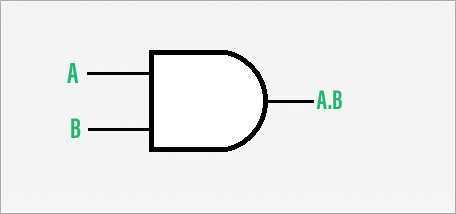
Function: Output is 1 only if ALL inputs are 1.
Truth Table:
A B | Output
0 0 | 0
0 1 | 0
1 0 | 0
1 1 | 1
OR Gate
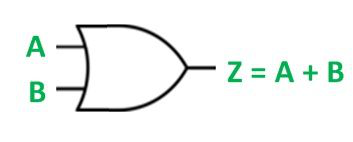
Function: Output is 1 if AT LEAST ONE input is 1.
Truth Table:
A B | Output
0 0 | 0
0 1 | 1
1 0 | 1
1 1 | 1
XOR Gate
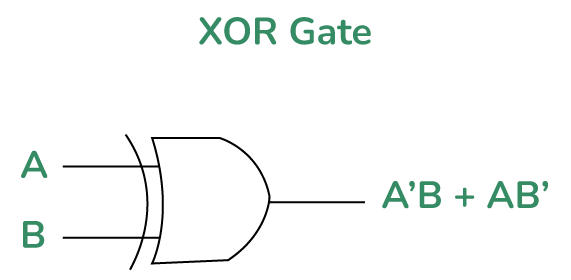
Function: Output is 1 if inputs are DIFFERENT.
Truth Table:
A B | Output
0 0 | 0
0 1 | 1
1 0 | 1
1 1 | 0
NOT Gate

Function: Output is the OPPOSITE of the input.
Truth Table:
Input | Output
0 | 1
1 | 0
Cybersecurity Perspective: Gate-Level Attacks
Understanding logic gates is crucial for:
- Side-channel attacks: Analyzing power consumption or electromagnetic emissions from gates
- Hardware security: Designing secure cryptographic circuits
- Fault injection attacks: Manipulating gate behavior through voltage or clock glitches
- Reverse engineering: Understanding proprietary hardware for security analysis
Memory Organization & Storage
Main Memory (RAM)
Random Access Memory: Volatile memory for storing data and programs during execution.
- Cell: Basic unit of memory (typically 8 bits = 1 byte)
- Address: Unique identifier for each memory cell
- Organization: Cells organized in addressable locations
Memory Capacity Measurements
Note: Computer memory uses binary prefixes where 1 KB = 1024 bytes (2¹⁰), not 1000 bytes.
- Kilobyte (KB): 1024 bytes
- Megabyte (MB): 1024 KB = 1,048,576 bytes
- Gigabyte (GB): 1024 MB = 1,073,741,824 bytes
- Terabyte (TB): 1024 GB = 1,099,511,627,776 bytes
- Petabyte (PB): 1024 TB = 1,125,899,906,842,624 bytes
Memory Terminology:
- Most Significant Bit (MSB): Leftmost bit in a byte
- Least Significant Bit (LSB): Rightmost bit in a byte
- Higher-order end: Left end of bit sequence
- Lower-order end: Right end of bit sequence
Mass Storage Systems
Why Mass Storage? Main memory is volatile and limited in size, so computers need additional storage.
Advantages
- Less volatility (data persists without power)
- Large storage capacity
- Lower cost per byte
- Removable media for archiving
Disadvantages
- Slower access (mechanical motion)
- Higher latency
- Physical wear and tear
- Susceptible to physical damage
Types of Mass Storage:
- Magnetic Systems: Hard disks, tapes (tracks and sectors)
- Optical Systems: CDs, DVDs, Blu-ray (pits and lands)
- Flash Memory: SSDs, USB drives, memory cards (electronic storage)
Cybersecurity: Storage Forensics & Data Recovery
Understanding storage systems is essential for:
- Digital forensics: Recovering deleted files from disk sectors
- Data recovery: Understanding file systems and storage layouts
- Secure deletion: Knowing how data persists on different media
- Storage encryption: Implementing full-disk encryption
- Anti-forensics: Techniques to hide or destroy digital evidence
Number Systems & Data Representation
Number Systems Comparison
| System | Base | Digits | Example | Bits per Digit | Primary Use |
|---|---|---|---|---|---|
| Binary | 2 | 0, 1 | 1101 | 1 | Computer internal operations |
| Decimal | 10 | 0-9 | 42 | ~3.32 | Human counting |
| Octal | 8 | 0-7 | 52 | 3 | UNIX permissions, historical systems |
| Hexadecimal | 16 | 0-9, A-F | 2A | 4 | Memory addresses, color codes |
Key Conversion Relationships:
• 1 Hexadecimal digit = 4 Binary digits (bits)
• 1 Octal digit = 3 Binary digits (bits)
• 3 Octal digits = 1 Byte (8 bits, with 1 bit unused)
• 2 Hexadecimal digits = 1 Byte (8 bits)
Number System Conversion Methods
Conversion Fundamentals: All number systems follow the same positional notation principle. Each digit's value = digit × (baseposition), where position starts at 0 from right.
| Conversion Type | Primary Method | Shortcut/Alternative | Cybersecurity Application |
|---|---|---|---|
| Decimal → Binary | Repeated Division by 2 | Subtraction of Powers of 2 | IP subnet calculations, bitmask operations |
| Binary → Decimal | Sum of (digit × 2position) | Double-dabble algorithm | Memory address calculation, packet analysis |
| Decimal → Hex | Repeated Division by 16 | Convert via binary (Dec→Bin→Hex) | Memory dump analysis, hex editors |
| Hex → Decimal | Sum of (digit × 16position) | Convert via binary (Hex→Bin→Dec) | Reverse engineering, malware analysis |
| Binary ↔ Hex | Group binary digits in 4s | Direct mapping (0000=0, 1111=F) | Compact representation of binary data |
| Binary ↔ Octal | Group binary digits in 3s | Direct mapping (000=0, 111=7) | UNIX file permission analysis |
Decimal to Binary Conversion
Method 1: Repeated Division
Example: Convert 4210 to binary
Result: Read remainders from bottom to top: 1010102
Method 2: Subtraction of Powers of 2
Example: Convert 4210 to binary
Result: 1010102 (32+8+2 = 42)
Binary to Decimal Conversion
Positional Weight Method
Example: Convert 1010102 to decimal
Result: 32 + 0 + 8 + 0 + 2 + 0 = 4210
💡 Quick Mental Calculation:
For binary numbers: Remember powers of 2: 1, 2, 4, 8, 16, 32, 64, 128, 256, 512, 1024...
Binary ↔ Hexadecimal Conversion
Binary to Hex: Group in 4s
Example: Convert 1101101010112 to hex
Result: DAB16
Hex to Binary: Expand each digit
Example: Convert 2F516 to binary
Result: 0010 1111 01012 = 10111101012
Decimal ↔ Hexadecimal Conversion
Decimal to Hex: Repeated Division by 16
Example: Convert 35010 to hex
Result: Read remainders bottom to top: 15E16
Hex to Decimal: Positional Weight
Example: Convert 2A316 to decimal
Result: 512 + 160 + 3 = 67510
Binary ↔ Octal Conversion
Binary to Octal: Group in 3s
Example: Convert 1011100112 to octal
Result: 5638
Octal to Binary: Expand each digit
Example: Convert 3478 to binary
Result: 011 100 1112 = 111001112
Practical Tools & PowerShell Commands
Windows Calculator (Programmer Mode)
PowerShell Conversion Commands
[Convert]::ToString(42, 2) # Returns: 101010
# Binary to Decimal
[Convert]::ToInt32("101010", 2) # Returns: 42
# Decimal to Hexadecimal
[Convert]::ToString(255, 16) # Returns: ff
# Hexadecimal to Decimal
[Convert]::ToInt32("FF", 16) # Returns: 255
Cybersecurity Applications of Number Conversion
Understanding number system conversions is essential in cybersecurity for:
- Memory Forensics: Reading hex dumps, understanding memory addresses
- Malware Analysis: Analyzing binary code, understanding opcodes
- Network Security: IP address calculations (IPv4 in decimal-dot to binary)
- Cryptography: Working with hex representations of encrypted data
- Digital Forensics: Interpreting file headers, analyzing disk sectors
- Reverse Engineering: Converting between assembly representations
- Log Analysis: Understanding hex-encoded log entries
🔍 Real-World Example: IP Address Conversion
IPv4 address 192.168.1.1 in binary:
Full binary: 11000000.10101000.00000001.00000001
Hex: C0.A8.01.01 (used in network packet analysis)
Text Representation
Character Encoding Standards:
- ASCII (7-bit): 128 characters, English text
- Extended ASCII (8-bit): 256 characters, includes symbols
- Unicode (UTF-8, UTF-16): Supports all languages
- UTF-8: Variable length (1-4 bytes), backward compatible with ASCII
- UTF-16: Fixed 2 or 4 bytes per character
H: 48 e: 65 l: 6C l: 6C o: 6F .: 2E
# Binary: 01001000 01100101 01101100 01101100 01101111 00101110
Image & Sound Representation
Images:
- Pixel (Picture Element): Smallest unit of an image
- Bitmap: Collection of encoded pixels
- Black & White: 1 bit per pixel (0=black, 1=white)
- Color (RGB): 3 bytes per pixel (1 byte each for Red, Green, Blue)
Sounds:
- Sampling: Measuring amplitude at regular intervals
- Sample rate: How often amplitude is measured (Hz)
- Bit depth: Number of bits per sample
Integer Representation: Two's Complement
Two's Complement: The most common method for representing signed integers in computers. Negative numbers are represented as the two's complement of their absolute value.
Key Features:
- Leftmost bit represents sign (0 = positive, 1 = negative)
- Range for n bits: -2ⁿ⁻¹ to 2ⁿ⁻¹ - 1
- Single representation for zero
- Simple addition/subtraction circuits
| Decimal | 4-bit Two's Complement | Calculation |
|---|---|---|
| +7 | 0111 | Largest positive |
| +1 | 0001 | 1 in binary |
| 0 | 0000 | Zero |
| -1 | 1111 | Invert bits of 1 and add 1 |
| -8 | 1000 | Smallest negative |
Overflow Problem:
When using 4-bit two's complement, the range is -8 to +7. Adding 5 + 4 = 9, which is outside this range, causes overflow. The result 0101 + 0100 = 1001, which is -7 in two's complement, not 9.
🏫 In-Class Practical Activities
🔍 Activity 1: Number System Conversions
Objective: Practice converting between different number systems
- Convert decimal 42 to binary, octal, and hexadecimal
- Convert binary 11011010 to decimal, octal, and hexadecimal
- Convert hexadecimal 2A to decimal, binary, and octal
- Convert octal 75 to decimal, binary, and hexadecimal
[Convert]::ToString(42, 2) # Decimal to binary
[Convert]::ToString(42, 8) # Decimal to octal
[Convert]::ToString(42, 16) # Decimal to hex
[Convert]::ToInt32("11011010", 2) # Binary to decimal
🔍 Activity 2: Boolean Logic & Gate Analysis
Objective: Analyze logic circuits and create truth tables
- Create truth tables for AND, OR, XOR, NAND, and NOR gates
- Analyze the circuit: NOT(AND(OR(A,B), C))
- Determine input patterns that produce output 1 for given circuits
- Design a circuit that outputs 1 only when exactly two inputs are 1
Gate Circuit Analysis:
For the circuit: Input → NOT → AND → Output, with another input going directly to AND. What inputs produce output 1?
🔍 Activity 3: Data Representation Exercises
Objective: Work with different data representation methods
- Convert the text "CYBER" to ASCII binary representation
- Calculate storage needed for a 1920×1080 color image (24-bit RGB)
- Represent decimal -15 in 8-bit two's complement
- Convert 0.625 (decimal) to binary fraction
- Calculate the range of integers representable with 16-bit two's complement
[System.Text.Encoding]::ASCII.GetBytes("CYBER")
# Returns: 67 89 66 69 82
# Converting decimal fraction to binary manually:
# 0.625 × 2 = 1.25 → 1 (MSB)
# 0.25 × 2 = 0.5 → 0
# 0.5 × 2 = 1.0 → 1 (LSB)
# Result: 0.101 binary
✅ Solutions for In-Class Activities
Activity 1 Solutions: Number System Conversions
1. Decimal 42 to binary, octal, hexadecimal:
- Binary: 1010102
- Octal: 528
- Hexadecimal: 2A16
2. Binary 11011010 to decimal, octal, hexadecimal:
- Decimal: 21810 (128+64+0+16+8+0+2+0 = 218)
- Octal: 3328 (011 011 010 = 3 3 2)
- Hexadecimal: DA16 (1101 1010 = D A)
3. Hexadecimal 2A to decimal, binary, octal:
- Decimal: 4210 (2×16 + 10×1 = 32+10 = 42)
- Binary: 001010102 (2=0010, A=1010)
- Octal: 528 (001 010 101 = 1 2 5, but grouping correctly: 101010 = 52)
4. Octal 75 to decimal, binary, hexadecimal:
- Decimal: 6110 (7×8 + 5×1 = 56+5 = 61)
- Binary: 1111012 (7=111, 5=101)
- Hexadecimal: 3D16 (0011 1101 = 3 D)
Activity 2 Solutions: Boolean Logic & Gate Analysis
Truth Tables for Basic Gates:
| A | B | AND | OR | XOR | NAND | NOR |
|---|---|---|---|---|---|---|
| 0 | 0 | 0 | 0 | 0 | 1 | 1 |
| 0 | 1 | 0 | 1 | 1 | 1 | 0 |
| 1 | 0 | 0 | 1 | 1 | 1 | 0 |
| 1 | 1 | 1 | 1 | 0 | 0 | 0 |
Circuit Analysis: NOT(AND(OR(A,B), C))
First, OR(A,B) produces 1 if A=1 OR B=1. Then AND with C produces 1 only if both OR(A,B)=1 AND C=1. Finally, NOT inverts the result.
Circuit that outputs 1 only when exactly two inputs are 1:
For three inputs A, B, C: Output = (A AND B AND NOT C) OR (A AND C AND NOT B) OR (B AND C AND NOT A)
Activity 3 Solutions: Data Representation Exercises
1. "CYBER" in ASCII binary:
- C: 6710 = 010000112
- Y: 8910 = 010110012
- B: 6610 = 010000102
- E: 6910 = 010001012
- R: 8210 = 010100102
2. Storage for 1920×1080 color image (24-bit RGB):
- Total pixels = 1920 × 1080 = 2,073,600 pixels
- Bits per pixel = 24 bits (3 bytes)
- Total bits = 2,073,600 × 24 = 49,766,400 bits
- Total bytes = 49,766,400 ÷ 8 = 6,220,800 bytes ≈ 5.93 MB
3. Decimal -15 in 8-bit two's complement:
- +15 in binary: 00001111
- Invert bits: 11110000
- Add 1: 11110001
- Result: 111100012
4. 0.625 decimal to binary fraction:
- 0.625 × 2 = 1.25 → 1 (MSB)
- 0.25 × 2 = 0.5 → 0
- 0.5 × 2 = 1.0 → 1 (LSB)
- Result: 0.1012
5. Range for 16-bit two's complement:
- Minimum: -215 = -32,768
- Maximum: 215 - 1 = 32,767
- Range: -32,768 to 32,767
Homework Assignment - Week 2
Submission Method: PDF document via Google Classroom
Instructions: Answer all questions in your own words. Show all work for calculations and programming exercises.
Part 1: Number System Conversions (40 points)
- Convert the following decimal numbers to binary, octal, and hexadecimal: (15 points)
- 37
- 125
- 255
- Convert the following binary numbers to decimal, octal, and hexadecimal: (15 points)
- 11001101
- 10101010
- 11110000
- Perform the following conversions: (10 points)
- Octal 347 to binary and hexadecimal
- Hexadecimal 2F5 to binary and decimal
Part 2: Boolean Logic & Data Representation (40 points)
- Complete the truth tables for the following logic gates: (15 points)
- AND gate (inputs A, B)
- OR gate (inputs A, B)
- XOR gate (inputs A, B)
- NAND gate (inputs A, B)
- Analyze the circuit: NOT(OR(AND(A,B), C)). Create a complete truth table for all possible input combinations (A, B, C). (10 points)
- Data Representation Problems: (15 points)
- Convert the text "SECURITY" to ASCII binary representation
- Represent decimal -27 in 8-bit two's complement
- Convert 0.375 (decimal) to binary fraction
Part 3: Practical Applications (20 points)
- IP Address Conversion: Convert the IPv4 address 172.16.254.1 to binary and hexadecimal representations. (10 points)
- Memory Calculation: If a computer has 8 GB of RAM, how many memory addresses can it theoretically access (assuming byte-addressable memory)? Show your calculations. (10 points)
Submission Guidelines
- Include your name, student ID, and "Week 2 Homework" at the top of the document
- Organize your answers clearly with question numbers and parts
- Show all work for calculations (don't just provide final answers)
- For truth tables, use proper formatting (rows and columns)
- Submit as a single PDF file named: "YourName_ID_Week2_HW.pdf"
💡 Tips for Success:
- Use the Windows Calculator in Programmer mode to verify your conversions
- Practice with PowerShell commands for number conversions
- Draw circuits and truth tables on paper before writing final answers
- Review the in-class activities before attempting the homework
From Bits to Security: Building Your Foundation
Understanding how data is represented at the binary level is not just academic knowledge - it's the foundation of cybersecurity. Every encryption algorithm, every forensic analysis, and every security protocol operates on these fundamental principles.
As cybersecurity engineers, you need to understand systems at their most basic level to effectively protect them, analyze attacks, and design secure solutions.
Access Week 3 Complete Materials